What fundamentally changed
At the start of 2025 I was excited when the agent produced working code out of the box. By the end of 2025, that became my default expectation. Now when it doesn't work, I don't think "models are bad". I get suspicious: either my spec was unclear, the agent didn't load the right context, or there's no tight way to verify the change.
Timeline of Models and Tools
Start of 2025: Cursor & Sonnet
I started the year using mostly Cursor, trying out different models.
You can see this from my cursor wrapped chart
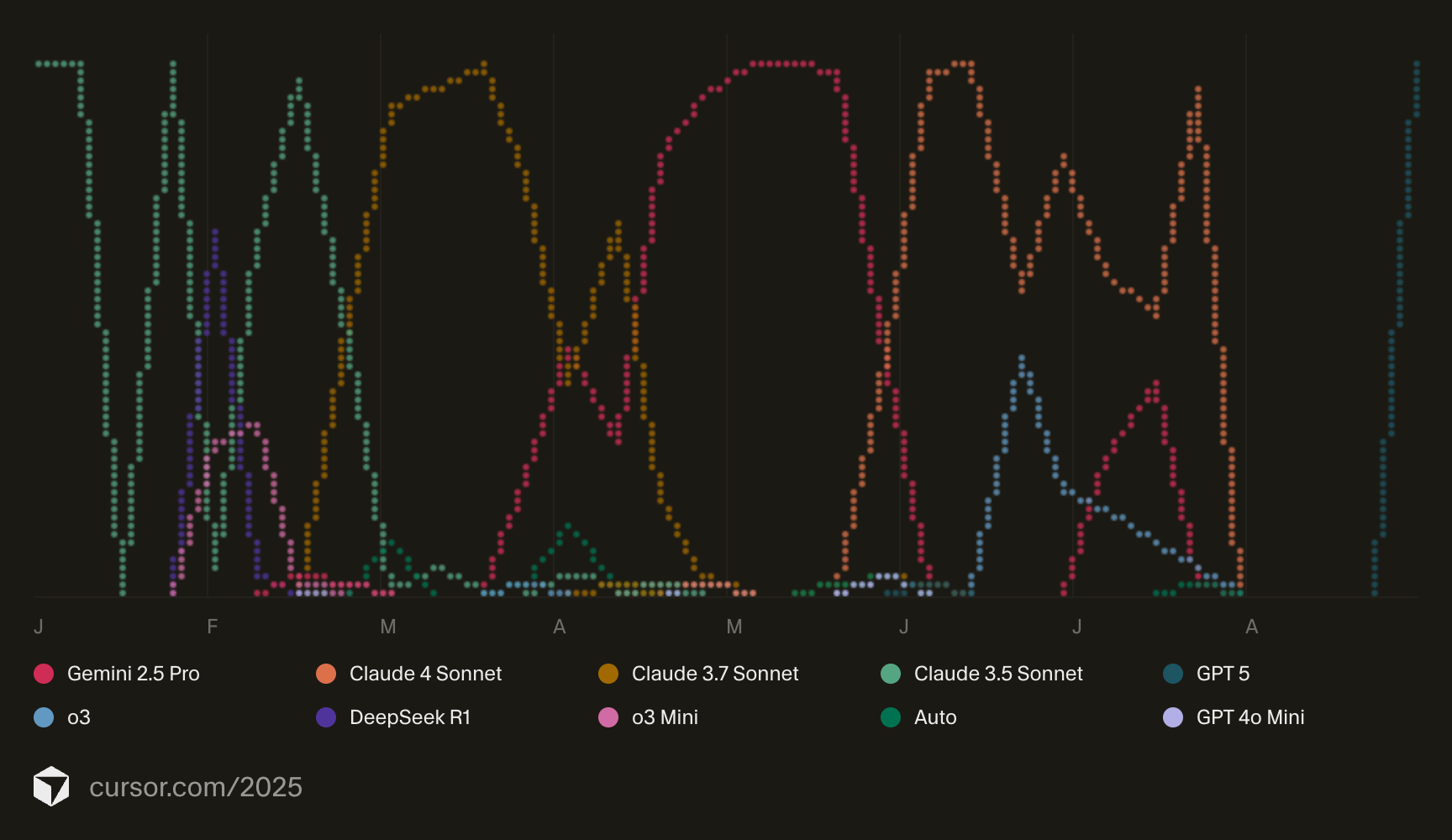
Early in the year, Sonnet 3.5 was my best option for coding tasks.
Then came Sonnet 3.7, a huge improvement. This was the first time I genuinely felt AI getting smarter. I built a complex machine learning + Mixed Integer Linear Programming project from scratch using sonnet 3.7 something 3.5 struggled with greatly.
End of April: Claude Code
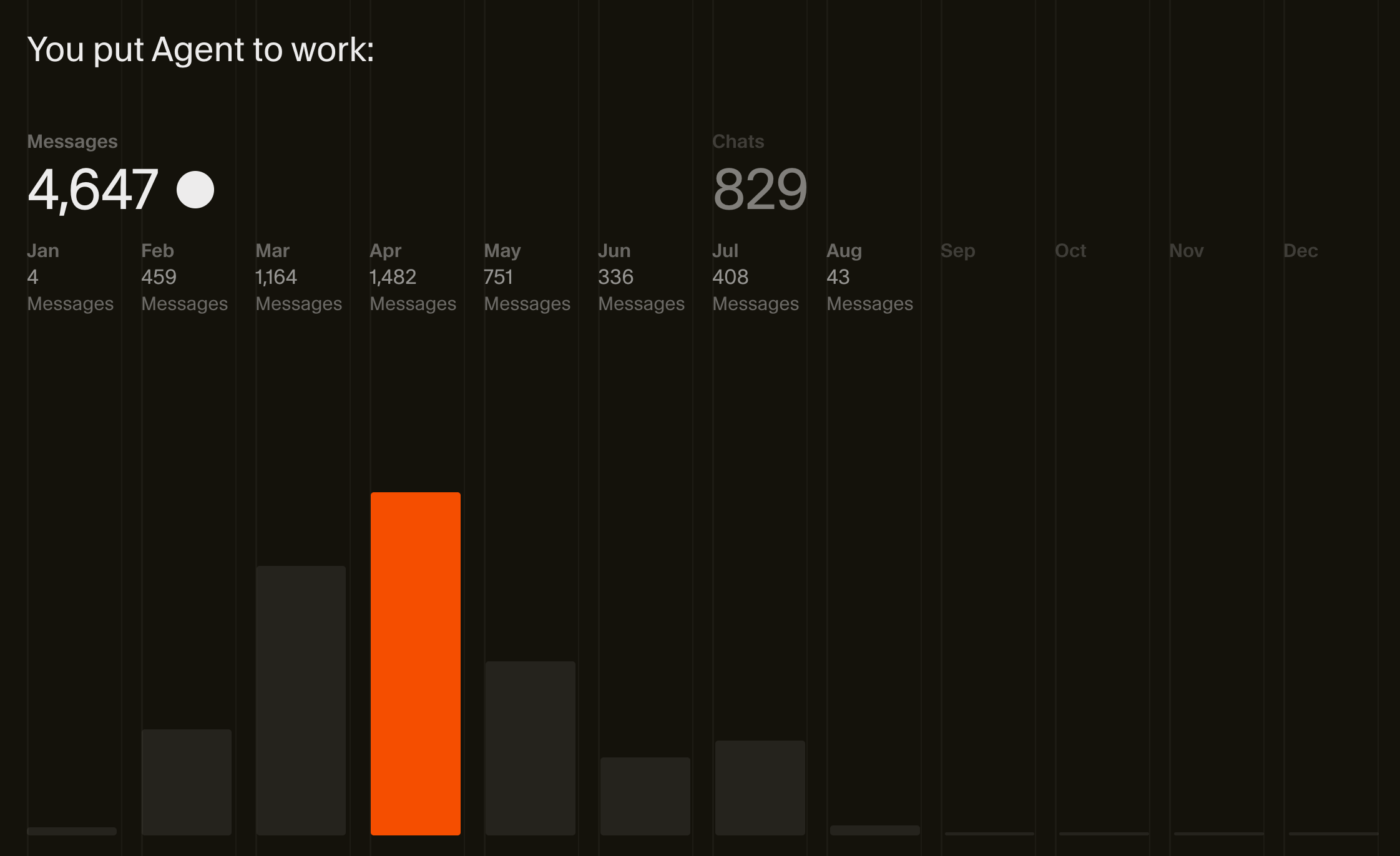
A significant leap this year was agentic CLI tools. Around April, Claude Code became my primary tool, and my Cursor usage almost entirely stopped by August. Claude Code was extremely powerful because of its harness, rate limits, tool use, and plan mode.
April: Raw Intelligence (o3)
Another big thing happened in April 2025 was the launch of o3 from openai. It was an extremely impressive model and was able to solve incredible complex analytical problems. I found myself using the following workflow quite often:
- Create an initial overview of the plan using Claude.
- Take the plan to o3, brainstorm about all the nuances, complexities. o3 was extremely good at finding gaps, and issues in the plan.
- Bring the refined plan back to Claude Code + Sonnet to implement.
Whenever there is a big issue CC + sonnet was stuck in a loop, I asked o3 and it was able to come up with a very elegant solution that claude was not able to, and claude usually was really impressed with o3's suggestions.
August: GPT-5
With the launch of gpt 5, there was finally a model that has the raw intelligence and coding capabilities combined in one model.
With this launch my coding tool of choice once again shifted. This time from Claude Code to Codex.
October: Skills
Another important upgrade to agents, alongside MCPs (also created by Anthropic), is agent skills. These are packaged capabilities the agent can use when instructed or when it finds it relevant. They're extremely useful if you find yourself repeatedly giving the same instruction to the agent. Instead of copy pasting the same prompt or sharing the same markdown file every time, you can package it in a skill.md file and let the agent use these instructions automatically.
I believe this will serve as a workaround until we solve memory.
November: GPT 5.1 Codex
One of the biggest improvements I think came with GPT 5.1 Codex with its exceptional instruction following abilities. It produces coherent, concise code without unnecessary verbosity or extra files.
At this point I have confidence that any well defined task will be correctly implemented by coding agents.
December: GPT 5.2
At this point any well defined task can be one shot implemented by codex. It's very diligent, and similar to 5.1, it has exceptional instruction following.
My mental model now: if Codex can't one-shot it, your spec is likely unclear, or you lack a verification loop (tests, local runs, integrations).
My current way of coding with AI
Here's how I code with AI as of January 2026.
I start every conversation by asking Codex to read specific files and explain how the project or feature works. This isn't because I need the summary, it's to ensure Codex understands the codebase before doing real work. To summarize effectively, it must first read and comprehend the relevant files. This gives Codex the right context from the start.
For any new feature, I create a detailed spec file first. This is the most important step in my workflow. Time spent here pays off significantly, so I focus deeply and give it my full attention.
My secret sauce is using two skills to create the plan:
Brainstorming
---
name: brainstorming
description: "You MUST use this before any creative work - creating features, building components, adding functionality, or modifying behavior. Explores user intent, requirements and design before implementation."

---

# Brainstorming Ideas Into Designs

## Overview

Help turn ideas into fully formed designs and specs through natural collaborative dialogue.

Start by understanding the current project context, then ask questions one at a time to refine the idea. Once you understand what you're building, present the design in small sections (200-300 words), checking after each section whether it looks right so far.

## The Process

**Understanding the idea:**

- Check out the current project state first (files, docs, recent commits)
- Ask questions one at a time to refine the idea
- Prefer multiple choice questions when possible, but open-ended is fine too
- Only one question per message - if a topic needs more exploration, break it into multiple questions
- Focus on understanding: purpose, constraints, success criteria

**Exploring approaches:**

- Propose 2-3 different approaches with trade-offs
- Present options conversationally with your recommendation and reasoning
- Always use very clear examples and language to explain your idea
- Lead with your recommended option and explain why

**Presenting the design:**

- Once you believe you understand what you're building, present the design
- Break it into sections of 200-300 words
- Ask after each section whether it looks right so far
- Cover: architecture, components, data flow, error handling, testing
- Be ready to go back and clarify if something doesn't make sense
- Always use very clear examples and language to explain your idea

## After the Design

**Documentation:**

- Check if there is existing documentation about this feature & issue & task in `plans/` folder
- If there is existing documentation, udpate it.
- If there is no existing documentation create a new markdown file and write the validated design to `plans/<topic>-design.md`
- Use elements-of-style:writing-clearly-and-concisely skill if available
- Commit the design document to git

**Implementation (if continuing):**

- Ask: "Ready to set up for implementation?"
- Use writing-plans to create detailed implementation plan

## Key Principles

- **One question at a time** - Don't overwhelm with multiple questions
- **Multiple choice preferred** - Easier to answer than open-ended when possible
- **YAGNI ruthlessly** - Remove unnecessary features from all designs
- **Explore alternatives** - Always propose 2-3 approaches before settling
- **Incremental validation** - Present design in sections, validate each
- **Be flexible** - Go back and clarify when something doesn't make sense
- **Use examples** Always use very clear examples and language to explain your idea, and add these examples in the docs
Writing Plans
---
name: writing-plans
description: Use when you have a spec or requirements for a multi-step task, before touching code

---

# Writing Plans

## Overview

Write comprehensive implementation plans assuming the engineer has zero context for our codebase and questionable taste. Document everything they need to know: which files to touch for each task, code, testing, docs they might need to check, how to test it. Give them the whole plan as bite-sized tasks. DRY. YAGNI. TDD. Frequent commits.

Assume they are a skilled developer, but know almost nothing about our toolset or problem domain. Assume they don't know good test design very well.

**Announce at start:** "I'm using the writing-plans skill to create the implementation plan."

**Save plans to:** `plans/<feature-name>.md`

## Bite-Sized Task Granularity

**Each step is one action (2-5 minutes):**

- "Write the failing test" - step
- "Run it to make sure it fails" - step
- "Implement the minimal code to make the test pass" - step
- "Run the tests and make sure they pass" - step
- "Commit" - step (Don't commit, ask for approval before committing - We may do more detailed testing before committing changes)

## Plan Document Header

**Every plan MUST start with this header:**

# [Feature Name] Implementation Plan

> **For Claude:** REQUIRED SUB-SKILL: Use executing-plans to implement this plan task-by-task.

**Goal:** [One sentence describing what this builds]

**Architecture:** [2-3 sentences about approach]

**Tech Stack:** [Key technologies/libraries]

---

## Task Structure

### Task N: [Component Name]

**Files:**
- Create: `exact/path/to/file.py`
- Modify: `exact/path/to/existing.py:123-145`
- Test: `tests/exact/path/to/test.py`

**Step 1: Write the failing test**

def test_specific_behavior():
    result = function(input)
    assert result == expected

**Step 2: Run test to verify it fails**

Expected: FAIL with "function not defined"

**Step 3: Write minimal implementation**

def function(input):
    return expected

**Step 4: Run test to verify it passes**

**Step 5: Commit**

git add tests/path/test.py src/path/file.py
git commit -m "feat: add specific feature"

## Remember
- Exact file paths always
- Complete code in plan (not "add validation")
- Exact commands with expected output
- Reference relevant skills with @ syntax
- DRY, YAGNI, TDD, frequent commits
These are skills I found in superpowers, I adopted them a little for my personal use.
During the brainstorming phase, codex interviews me, asks me a bunch of questions, and clarifies any open questions. Writing Plans skill turns the brainstorming into a written plan.
Writing plans skills write them in a way that as if it's going to be implemented by an engineer that knows nothing about the codebase (this is essentially codex with fresh context window)
After brainstorm and writing plans steps are done, I move to the implementation phase. Here I use 2 skills:
Executing Plans
---
name: executing-plans
description: Use when you have a written implementation plan to execute in a separate session with review checkpoints

---

# Executing Plans

## Overview

Load plan, review critically, execute tasks in batches, report for review between batches.

**Core principle:** Batch execution with checkpoints for architect review.

## The Process

### Step 1: Load and Review Plan

1. Read plan file
2. Review critically - identify any questions or concerns about the plan
3. If concerns: Raise them with your human partner before starting
4. If no concerns: Create TodoWrite and proceed

### Step 2: Execute Batch

**Default: First 3 tasks**

For each task:

1. Mark as in_progress
2. Follow each step exactly (plan has bite-sized steps)
3. Run verifications as specified
4. Mark as completed
5. Don't forget to use test-driven-development skill and use TDD during the process if the feature you're implementing allows for TDD

### Step 3: Report

When batch complete:

- Show what was implemented
- Show verification output
- Say: "Ready for feedback."

### Step 4: Continue

Based on feedback:

- Apply changes if needed
- Execute next batch
- Repeat until complete

## When to Stop and Ask for Help

**STOP executing immediately when:**

- Hit a blocker mid-batch (missing dependency, test fails, instruction unclear)
- Plan has critical gaps preventing starting
- You don't understand an instruction
- Verification fails repeatedly

**Ask for clarification rather than guessing.**

## When to Revisit Earlier Steps

**Return to Review (Step 1) when:**

- Partner updates the plan based on your feedback
- Fundamental approach needs rethinking

**Don't force through blockers** - stop and ask.

## Remember

- Review plan critically first
- Follow plan steps exactly
- Don't skip verifications
- Reference skills when plan says to
- Between batches: just report and wait
- Stop when blocked, don't guess
Test-Driven Development
---
name: test-driven-development
description: Use when implementing any feature or bugfix, before writing implementation code

---

# Test-Driven Development (TDD)

## Overview

Write the test first. Watch it fail. Write minimal code to pass.

**Core principle:** If you didn't watch the test fail, you don't know if it tests the right thing.

**Violating the letter of the rules is violating the spirit of the rules.**

## When to Use

**Always:**

- New features
- Bug fixes
- Refactoring
- Behavior changes

**Exceptions (ask your human partner):**

- Throwaway prototypes
- Generated code
- Configuration files

Thinking "skip TDD just this once"? Stop. That's rationalization.

## The Iron Law

NO PRODUCTION CODE WITHOUT A FAILING TEST FIRST

Write code before the test? Delete it. Start over.

**No exceptions:**

- Don't keep it as "reference"
- Don't "adapt" it while writing tests
- Don't look at it
- Delete means delete

Implement fresh from tests. Period.

## Red-Green-Refactor

### RED - Write Failing Test

Write one minimal test showing what should happen.

**Good:**

test('retries failed operations 3 times', async () => {
  let attempts = 0;
  const operation = () => {
    attempts++;
    if (attempts < 3) throw new Error('fail');
    return 'success';
  };

  const result = await retryOperation(operation);

  expect(result).toBe('success');
  expect(attempts).toBe(3);
});

Clear name, tests real behavior, one thing

**Bad:**

test('retry works', async () => {
  const mock = jest.fn()
    .mockRejectedValueOnce(new Error())
    .mockRejectedValueOnce(new Error())
    .mockResolvedValueOnce('success');
  await retryOperation(mock);
  expect(mock).toHaveBeenCalledTimes(3);
});

Vague name, tests mock not code

**Requirements:**

- One behavior
- Clear name
- Real code (no mocks unless unavoidable)

### Verify RED - Watch It Fail

**MANDATORY. Never skip.**

npm test path/to/test.test.ts

Confirm:

- Test fails (not errors)
- Failure message is expected
- Fails because feature missing (not typos)

**Test passes?** You're testing existing behavior. Fix test.

**Test errors?** Fix error, re-run until it fails correctly.

### GREEN - Minimal Code

Write simplest code to pass the test.

**Good:**

async function retryOperation<T>(fn: () => Promise<T>): Promise<T> {
  for (let i = 0; i < 3; i++) {
    try {
      return await fn();
    } catch (e) {
      if (i === 2) throw e;
    }
  }
  throw new Error('unreachable');
}

Just enough to pass

**Bad:**

async function retryOperation<T>(
  fn: () => Promise<T>,
  options?: {
    maxRetries?: number;
    backoff?: 'linear' | 'exponential';
    onRetry?: (attempt: number) => void;
  }
): Promise<T> {
  // YAGNI
}

Over-engineered

Don't add features, refactor other code, or "improve" beyond the test.

### Verify GREEN - Watch It Pass

**MANDATORY.**

npm test path/to/test.test.ts

Confirm:

- Test passes
- Other tests still pass
- Output pristine (no errors, warnings)

**Test fails?** Fix code, not test.

**Other tests fail?** Fix now.

### REFACTOR - Clean Up

After green only:

- Remove duplication
- Improve names
- Extract helpers

Keep tests green. Don't add behavior.

### Repeat

Next failing test for next feature.

## Good Tests

| Quality          | Good                                | Bad                                                 |
| ---------------- | ----------------------------------- | --------------------------------------------------- |
| **Minimal**      | One thing. "and" in name? Split it. | test('validates email and domain and whitespace') |
| **Clear**        | Name describes behavior             | test('test1')                                     |
| **Shows intent** | Demonstrates desired API            | Obscures what code should do                        |

## Why Order Matters

**"I'll write tests after to verify it works"**

Tests written after code pass immediately. Passing immediately proves nothing:

- Might test wrong thing
- Might test implementation, not behavior
- Might miss edge cases you forgot
- You never saw it catch the bug

Test-first forces you to see the test fail, proving it actually tests something.

**"I already manually tested all the edge cases"**

Manual testing is ad-hoc. You think you tested everything but:

- No record of what you tested
- Can't re-run when code changes
- Easy to forget cases under pressure
- "It worked when I tried it" ≠ comprehensive

Automated tests are systematic. They run the same way every time.

**"Deleting X hours of work is wasteful"**

Sunk cost fallacy. The time is already gone. Your choice now:

- Delete and rewrite with TDD (X more hours, high confidence)
- Keep it and add tests after (30 min, low confidence, likely bugs)

The "waste" is keeping code you can't trust. Working code without real tests is technical debt.

**"TDD is dogmatic, being pragmatic means adapting"**

TDD IS pragmatic:

- Finds bugs before commit (faster than debugging after)
- Prevents regressions (tests catch breaks immediately)
- Documents behavior (tests show how to use code)
- Enables refactoring (change freely, tests catch breaks)

"Pragmatic" shortcuts = debugging in production = slower.

**"Tests after achieve the same goals - it's spirit not ritual"**

No. Tests-after answer "What does this do?" Tests-first answer "What should this do?"

Tests-after are biased by your implementation. You test what you built, not what's required. You verify remembered edge cases, not discovered ones.

Tests-first force edge case discovery before implementing. Tests-after verify you remembered everything (you didn't).

30 minutes of tests after ≠ TDD. You get coverage, lose proof tests work.

## Common Rationalizations

| Excuse                                 | Reality                                                      |
| -------------------------------------- | ------------------------------------------------------------ |
| "Too simple to test"                   | Simple code breaks. Test takes 30 seconds.                   |
| "I'll test after"                      | Tests passing immediately prove nothing.                     |
| "Tests after achieve same goals"       | Tests-after = "what does this do?" Tests-first = "what should this do?" |
| "Already manually tested"              | Ad-hoc ≠ systematic. No record, can't re-run.                |
| "Deleting X hours is wasteful"         | Sunk cost fallacy. Keeping unverified code is technical debt. |
| "Keep as reference, write tests first" | You'll adapt it. That's testing after. Delete means delete.  |
| "Need to explore first"                | Fine. Throw away exploration, start with TDD.                |
| "Test hard = design unclear"           | Listen to test. Hard to test = hard to use.                  |
| "TDD will slow me down"                | TDD faster than debugging. Pragmatic = test-first.           |
| "Manual test faster"                   | Manual doesn't prove edge cases. You'll re-test every change. |
| "Existing code has no tests"           | You're improving it. Add tests for existing code.            |

## Red Flags - STOP and Start Over

- Code before test
- Test after implementation
- Test passes immediately
- Can't explain why test failed
- Tests added "later"
- Rationalizing "just this once"
- "I already manually tested it"
- "Tests after achieve the same purpose"
- "It's about spirit not ritual"
- "Keep as reference" or "adapt existing code"
- "Already spent X hours, deleting is wasteful"
- "TDD is dogmatic, I'm being pragmatic"
- "This is different because..."

**All of these mean: Delete code. Start over with TDD.**

## Example: Bug Fix

**Bug:** Empty email accepted

**RED**

test('rejects empty email', async () => {
  const result = await submitForm({ email: '' });
  expect(result.error).toBe('Email required');
});

**Verify RED**

$ npm test
FAIL: expected 'Email required', got undefined

**GREEN**

function submitForm(data: FormData) {
  if (!data.email?.trim()) {
    return { error: 'Email required' };
  }
  // ...
}

**Verify GREEN**

$ npm test
PASS

**REFACTOR**
Extract validation for multiple fields if needed.

## Verification Checklist

Before marking work complete:

- [ ] Every new function/method has a test
- [ ] Watched each test fail before implementing
- [ ] Each test failed for expected reason (feature missing, not typo)
- [ ] Wrote minimal code to pass each test
- [ ] All tests pass
- [ ] Output pristine (no errors, warnings)
- [ ] Tests use real code (mocks only if unavoidable)
- [ ] Edge cases and errors covered

Can't check all boxes? You skipped TDD. Start over.

## When Stuck

| Problem                | Solution                                                     |
| ---------------------- | ------------------------------------------------------------ |
| Don't know how to test | Write wished-for API. Write assertion first. Ask your human partner. |
| Test too complicated   | Design too complicated. Simplify interface.                  |
| Must mock everything   | Code too coupled. Use dependency injection.                  |
| Test setup huge        | Extract helpers. Still complex? Simplify design.             |

## Debugging Integration

Bug found? Write failing test reproducing it. Follow TDD cycle. Test proves fix and prevents regression.

Never fix bugs without a test.

## Testing Anti-Patterns

When adding mocks or test utilities, read @testing-anti-patterns.md to avoid common pitfalls:

- Testing mock behavior instead of real behavior
- Adding test-only methods to production classes
- Mocking without understanding dependencies

## Final Rule

Production code → test exists and failed first
Otherwise → not TDD

No exceptions without your human partner's permission.
These 2 skills are all you need to implement the a very well defined plan. Codex will likely one shot your feature.
After each subtask is implemented, I use /review codex to review that subtask and tackle any issues it finds. It's vastly superhuman when it comes to code reviews. I would never have found some issues identified by codex until much later, when they result in a bug in production.
These 4 skills are useful but they're not required. They are just a way to implement some best practices of coding with ai agents:
- Create a clear plan the agent can follow, don't leave important choices undefined
- Encourage the agent to ask questions when in doubt
- Make the feature verifiable by the agent (unit tests, integration tests, local runs, frontend checks)—TDD is especially useful here
- Work incrementally. Have the agent review small tasks and fix issues while the diff is manageable
You can follow these best practices without using skills but since these are some instructions you will likely repeat many many many times you might as well turn them into skills.